
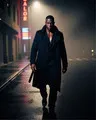
First generation may take a bit longer.
Details
- Type
- Style
- Base model
- Z-Image Turbo
- Price per use
- Free
Anima Version Trigger: @sinozick Useful tags to help with the style Art Style & Lineart Tags • flat color (Danbooru tag for solid, unblended coloring) • cel shading (Standard tag for hard-edged shadows) • thick lineart (Triggers heavy, prominent outlines) • sketchy / rough (For the loose, scratched texture work) • cross hatching (For the ink-line shadow detailing) • high contrast (For the sharp transition between dark and light) • screentone (The exact database tag for halftone dots, pointillism textures, and comic book shading) • pop art (Triggers the retro, high-contrast commercial art aesthetic) • ben day dots (Triggers the vintage printing press dot pattern) • limited palette / two tone (Perfect for combining with spot color to get that stark graphic novel contrast) • duotone (Forces the image into two primary contrasting colors, like the teal and yellow) • shading ring / halftone effect (For modern model variations recognizing localized patterned shadows) • optional - film grain 🌓 Theme & Color Mechanics • dark theme (Sets the overall moody, low-key atmosphere) • monochrome (Useful as a base modifier before adding an accent) • spot color (The official tag for an image that is mostly monochrome except for one vibrant color) • bioluminescent / glowing (Triggers the neon light effect) • glowing aura / halo (For the ring of light around the head) my goto prompt to get started: sinozick style, flat color, dark theme, cel shading, thick ink lineart, spot color, thick lineart, ------------------------------------------------------------------------------------------ my experimental iteration of sinozick's style. Credit to @Shiiro and Sinozick for the cool as aesthetic style